Observer
Read in~10 min
Written by - RefactoringGuru
Also known as: Event-Subscriber, Listener
Intent
Observer is a behavioral design pattern that lets you define a subscription mechanism to notify multiple objects about any events that happen to the object they’re observing.
Problem
Imagine that you have two types of objects: a Customer and a Store. The customer is very interested in a particular brand of product (say, it’s a new model of the iPhone) which should become available in the store very soon.
The customer could visit the store every day and check product availability. But while the product is still en route, most of these trips would be pointless.
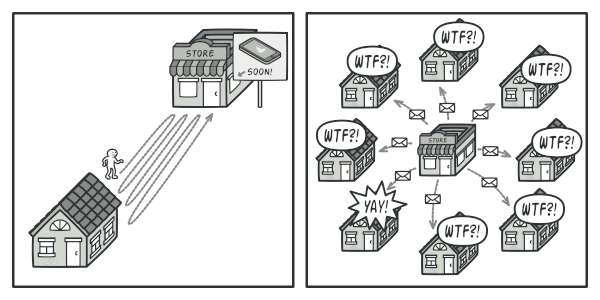
On the other hand, the store could send tons of emails (which might be considered spam) to all customers each time a new product becomes available. This would save some customers from endless trips to the store. At the same time, it’d upset other customers who aren’t interested in new products.
It looks like we’ve got a conflict. Either the customer wastes time checking product availability or the store wastes resources notifying the wrong customers.
Solution
The object that has some interesting state is often called subject, but since it’s also going to notify other objects about the changes to its state, we’ll call it publisher. All other objects that want to track changes to the publisher’s state are called subscribers.
The Observer pattern suggests that you add a subscription mechanism to the publisher class so individual objects can subscribe to or unsubscribe from a stream of events coming from that publisher. Fear not! Everything isn’t as complicated as it sounds. In reality, this mechanism consists of 1) an array field for storing a list of references to subscriber objects and 2) several public methods which allow adding subscribers to and removing them from that list.
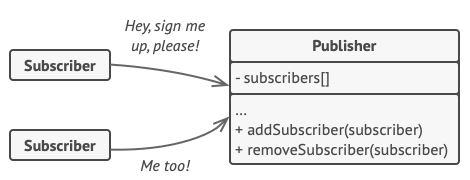
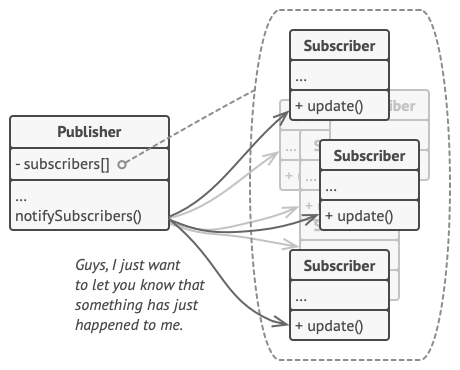
Now, whenever an important event happens to the publisher, it goes over its subscribers and calls the specific notification method on their objects.
Real apps might have dozens of different subscriber classes that are interested in tracking events of the same publisher class. You wouldn’t want to couple the publisher to all of those classes. Besides, you might not even know about some of them beforehand if your publisher class is supposed to be used by other people.
That’s why it’s crucial that all subscribers implement the same interface and that the publisher communicates with them only via that interface. This interface should declare the notification method along with a set of parameters that the publisher can use to pass some contextual data along with the notification.
If your app has several different types of publishers and you want to make your subscribers compatible with all of them, you can go even further and make all publishers follow the same interface. This interface would only need to describe a few subscription methods. The interface would allow subscribers to observe publishers’ states without coupling to their concrete classes.
Real-World Analogy

If you subscribe to a newspaper or magazine, you no longer need to go to the store to check if the next issue is available. Instead, the publisher sends new issues directly to your mailbox right after publication or even in advance.
The publisher maintains a list of subscribers and knows which magazines they’re interested in. Subscribers can leave the list at any time when they wish to stop the publisher sending new magazine issues to them.
Structure
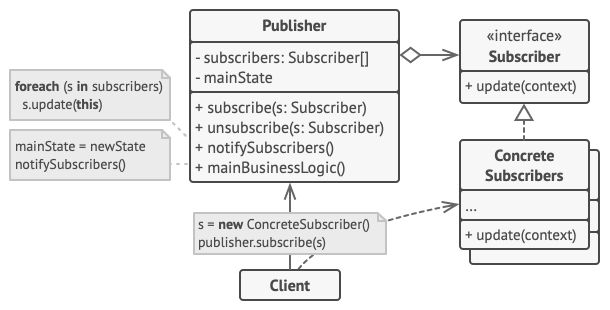
-
The Publisher issues events of interest to other objects. These events occur when the publisher changes its state or executes some behaviors. Publishers contain a subscription infrastructure that lets new subscribers join and current subscribers leave the list.
-
When a new event happens, the publisher goes over the subscription list and calls the notification method declared in the subscriber interface on each subscriber object.
-
The Subscriber interface declares the notification interface. In most cases, it consists of a single
updatemethod. The method may have several parameters that let the publisher pass some event details along with the update. -
Concrete Subscribers perform some actions in response to notifications issued by the publisher. All of these classes must implement the same interface so the publisher isn’t coupled to concrete classes.
-
Usually, subscribers need some contextual information to handle the update correctly. For this reason, publishers often pass some context data as arguments of the notification method. The publisher can pass itself as an argument, letting subscriber fetch any required data directly.
-
The Client creates publisher and subscriber objects separately and then registers subscribers for publisher updates.
Applicability
- Use the Observer pattern when changes to the state of one object may require changing other objects, and the actual set of objects is unknown beforehand or changes dynamically.
You can often experience this problem when working with classes of the graphical user interface. For example, you created custom button classes, and you want to let the clients hook some custom code to your buttons so that it fires whenever a user presses a button.
- The Observer pattern lets any object that implements the subscriber interface subscribe for event notifications in publisher objects. You can add the subscription mechanism to your buttons, letting the clients hook up their custom code via custom subscriber classes.
Use the pattern when some objects in your app must observe others, but only for a limited time or in specific cases.
The subscription list is dynamic, so subscribers can join or leave the list whenever they need to.
How to Implement
-
Look over your business logic and try to break it down into two parts: the core functionality, independent from other code, will act as the publisher; the rest will turn into a set of subscriber classes.
-
Declare the subscriber interface. At a bare minimum, it should declare a single update method.
-
Declare the publisher interface and describe a pair of methods for adding a subscriber object to and removing it from the list. Remember that publishers must work with subscribers only via the subscriber interface.
-
Decide where to put the actual subscription list and the implementation of subscription methods. Usually, this code looks the same for all types of publishers, so the obvious place to put it is in an abstract class derived directly from the publisher interface. Concrete publishers extend that class, inheriting the subscription behavior.
However, if you’re applying the pattern to an existing class hierarchy, consider an approach based on composition: put the subscription logic into a separate object, and make all real publishers use it.
-
Create concrete publisher classes. Each time something important happens inside a publisher, it must notify all its subscribers.
-
Implement the update notification methods in concrete subscriber classes. Most subscribers would need some context data about the event. It can be passed as an argument of the notification method.
But there’s another option. Upon receiving a notification, the subscriber can fetch any data directly from the notification. In this case, the publisher must pass itself via the update method. The less flexible option is to link a publisher to the subscriber permanently via the constructor.
- The client must create all necessary subscribers and register them with proper publishers.
Pros and Cons
| Nice | Bad |
|---|---|
| Open/Closed Principle. You can introduce new subscriber classes without having to change the publisher’s code (and vice versa if there’s a publisher interface). | Subscribers are notified in random order. |
| You can establish relations between objects at runtime. |
Relations with Other Patterns
-
Chain of Responsibility, Command, Mediator and Observer address various ways of connecting senders and receivers of requests:
- Chain of Responsibility passes a request sequentially along a dynamic chain of potential receivers until one of them handles it.
- Command establishes unidirectional connections between senders and receivers.
- Mediator eliminates direct connections between senders and receivers, forcing them to communicate indirectly via a mediator object.
- Observer lets receivers dynamically subscribe to and unsubscribe from receiving requests.
-
The difference between Mediator and Observer is often elusive. In most cases, you can implement either of these patterns; but sometimes you can apply both simultaneously. Let’s see how we can do that.
The primary goal of Mediator is to eliminate mutual dependencies among a set of system components. Instead, these components become dependent on a single mediator object. The goal of Observer is to establish dynamic one-way connections between objects, where some objects act as subordinates of others.
There’s a popular implementation of the Mediator pattern that relies on Observer. The mediator object plays the role of publisher, and the components act as subscribers which subscribe to and unsubscribe from the mediator’s events. When Mediator is implemented this way, it may look very similar to Observer.
When you’re confused, remember that you can implement the Mediator pattern in other ways. For example, you can permanently link all the components to the same mediator object. This implementation won’t resemble Observer but will still be an instance of the Mediator pattern.
Now imagine a program where all components have become publishers, allowing dynamic connections between each other. There won’t be a centralized mediator object, only a distributed set of observers.
Conceptual Example
/**
 * Observer Design Pattern
 *
 * Intent: Lets you define a subscription mechanism to notify multiple objects
 * about any events that happen to the object they're observing.
 *
 * Note that there's a lot of different terms with similar meaning associated
 * with this pattern. Just remember that the Subject is also called the
 * Publisher and the Observer is often called the Subscriber and vice versa.
 * Also the verbs "observe", "listen" or "track" usually mean the same thing.
 */

#include <iostream>
#include <list>
#include <string>

class IObserver {
public:
  virtual ~IObserver(){};
  virtual void Update(const std::string &message_from_subject) = 0;
};

class ISubject {
public:
  virtual ~ISubject(){};
  virtual void Attach(IObserver *observer) = 0;
  virtual void Detach(IObserver *observer) = 0;
  virtual void Notify() = 0;
};

/**
 * The Subject owns some important state and notifies observers when the state
 * changes.
 */

class Subject : public ISubject {
public:
  virtual ~Subject() { std::cout << "Goodbye, I was the Subject.\n"; }

  /**
   * The subscription management methods.
   */
  void Attach(IObserver *observer) override {
    list_observer_.push_back(observer);
  }
  void Detach(IObserver *observer) override { list_observer_.remove(observer); }
  void Notify() override {
    std::list<IObserver *>::iterator iterator = list_observer_.begin();
    HowManyObserver();
    while (iterator != list_observer_.end()) {
      (*iterator)->Update(message_);
      ++iterator;
    }
  }

  void CreateMessage(std::string message = "Empty") {
    this->message_ = message;
    Notify();
  }
  void HowManyObserver() {
    std::cout << "There are " << list_observer_.size()
              << " observers in the list.\n";
  }

  /**
   * Usually, the subscription logic is only a fraction of what a Subject can
   * really do. Subjects commonly hold some important business logic, that
   * triggers a notification method whenever something important is about to
   * happen (or after it).
   */
  void SomeBusinessLogic() {
    this->message_ = "change message message";
    Notify();
    std::cout << "I'm about to do some thing important\n";
  }

private:
  std::list<IObserver *> list_observer_;
  std::string message_;
};

class Observer : public IObserver {
public:
  Observer(Subject &subject) : subject_(subject) {
    this->subject_.Attach(this);
    std::cout << "Hi, I'm the Observer \"" << ++Observer::static_number_
              << "\".\n";
    this->number_ = Observer::static_number_;
  }
  virtual ~Observer() {
    std::cout << "Goodbye, I was the Observer \"" << this->number_ << "\".\n";
  }

  void Update(const std::string &message_from_subject) override {
    message_from_subject_ = message_from_subject;
    PrintInfo();
  }
  void RemoveMeFromTheList() {
    subject_.Detach(this);
    std::cout << "Observer \"" << number_ << "\" removed from the list.\n";
  }
  void PrintInfo() {
    std::cout << "Observer \"" << this->number_
              << "\": a new message is available --> "
              << this->message_from_subject_ << "\n";
  }

private:
  std::string message_from_subject_;
  Subject &subject_;
  static int static_number_;
  int number_;
};

int Observer::static_number_ = 0;

void ClientCode() {
  Subject *subject = new Subject;
  Observer *observer1 = new Observer(*subject);
  Observer *observer2 = new Observer(*subject);
  Observer *observer3 = new Observer(*subject);
  Observer *observer4;
  Observer *observer5;

  subject->CreateMessage("Hello World! :D");
  observer3->RemoveMeFromTheList();

  subject->CreateMessage("The weather is hot today! :p");
  observer4 = new Observer(*subject);

  observer2->RemoveMeFromTheList();
  observer5 = new Observer(*subject);

  subject->CreateMessage("My new car is great! ;)");
  observer5->RemoveMeFromTheList();

  observer4->RemoveMeFromTheList();
  observer1->RemoveMeFromTheList();

  delete observer5;
  delete observer4;
  delete observer3;
  delete observer2;
  delete observer1;
  delete subject;
}

int main() {
  ClientCode();
  return 0;
}