Composite
Read in~10 min
Written by - RefactoringGuru
Also known as: Object Tree
Intent
Composite is a structural design pattern that lets you split a large class or a set of closely related classes into two separate hierarchies—abstraction and implementation—which can be developed independently of each other.
Problem
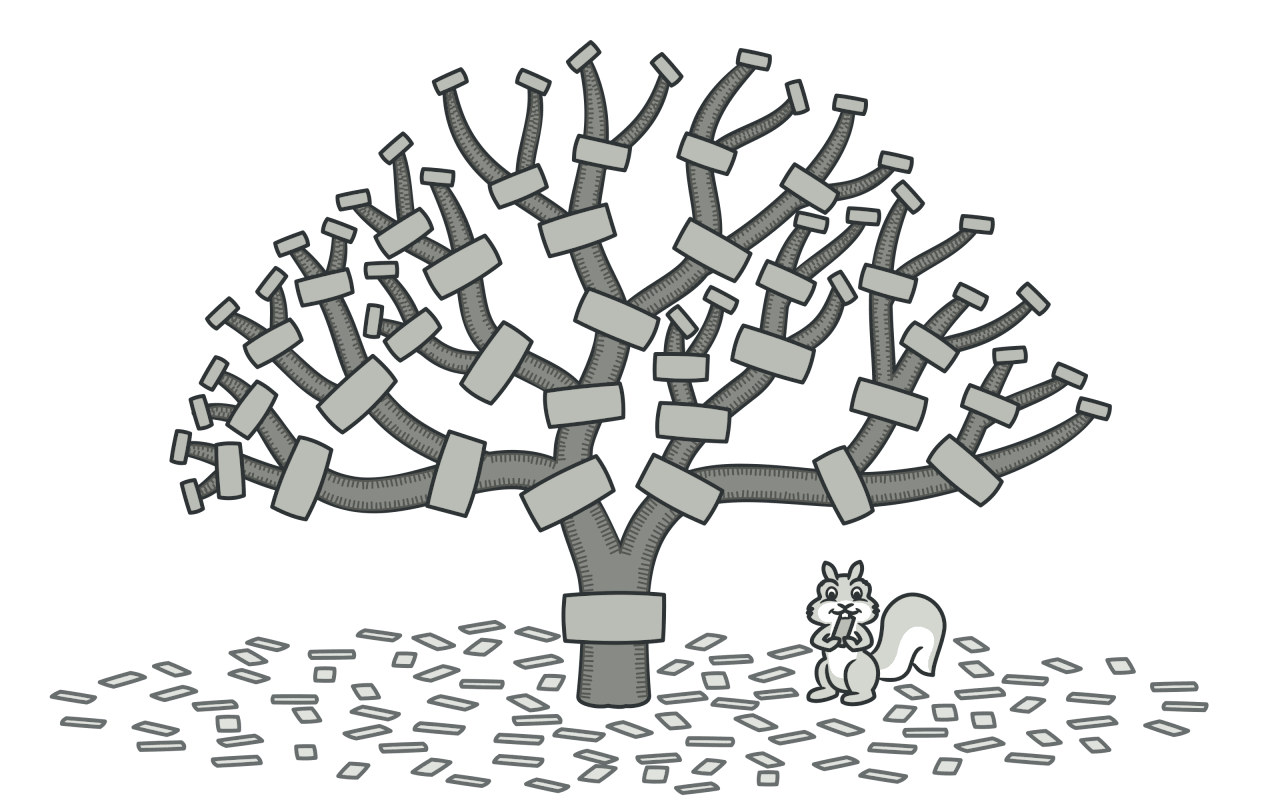
Using the Composite pattern makes sense only when the core model of your app can be represented as a tree.
For example, imagine that you have two types of objects: Products and Boxes. A Box can contain several Products as well as a number of smaller Boxes. These little Boxes can also hold some Products or even smaller Boxes, and so on.
Say you decide to create an ordering system that uses these classes. Orders could contain simple products without any wrapping, as well as boxes stuffed with products…and other boxes. How would you determine the total price of such an order?
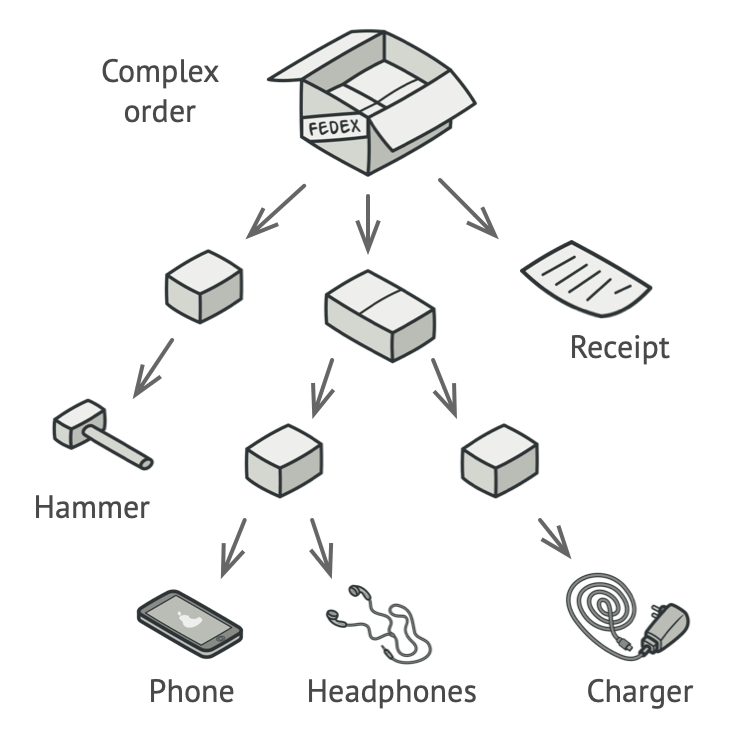
You could try the direct approach: unwrap all the boxes, go over all the products and then calculate the total. That would be doable in the real world; but in a program, it’s not as simple as running a loop. You have to know the classes of Products and Boxes you’re going through, the nesting level of the boxes and other nasty details beforehand. All of this makes the direct approach either too awkward or even impossible.
Solution
The Composite pattern suggests that you work with Products and Boxes through a common interface which declares a method for calculating the total price.
How would this method work? For a product, it’d simply return the product’s price. For a box, it’d go over each item the box contains, ask its price and then return a total for this box. If one of these items were a smaller box, that box would also start going over its contents and so on, until the prices of all inner components were calculated. A box could even add some extra cost to the final price, such as packaging cost.

The greatest benefit of this approach is that you don’t need to care about the concrete classes of objects that compose the tree. You don’t need to know whether an object is a simple product or a sophisticated box. You can treat them all the same via the common interface. When you call a method, the objects themselves pass the request down the tree.
Real-World Analogy
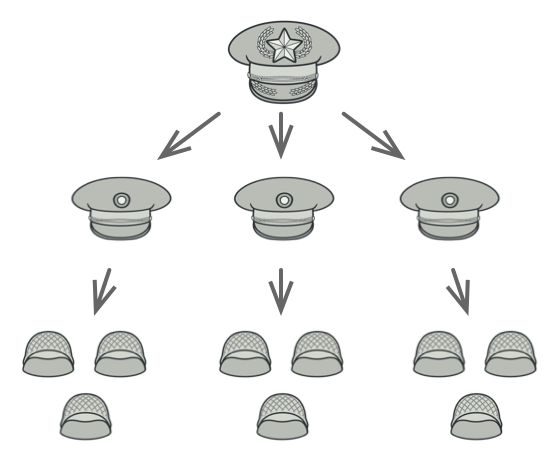
Armies of most countries are structured as hierarchies. An army consists of several divisions; a division is a set of brigades, and a brigade consists of platoons, which can be broken down into squads. Finally, a squad is a small group of real soldiers. Orders are given at the top of the hierarchy and passed down onto each level until every soldier knows what needs to be done.
Structure
-
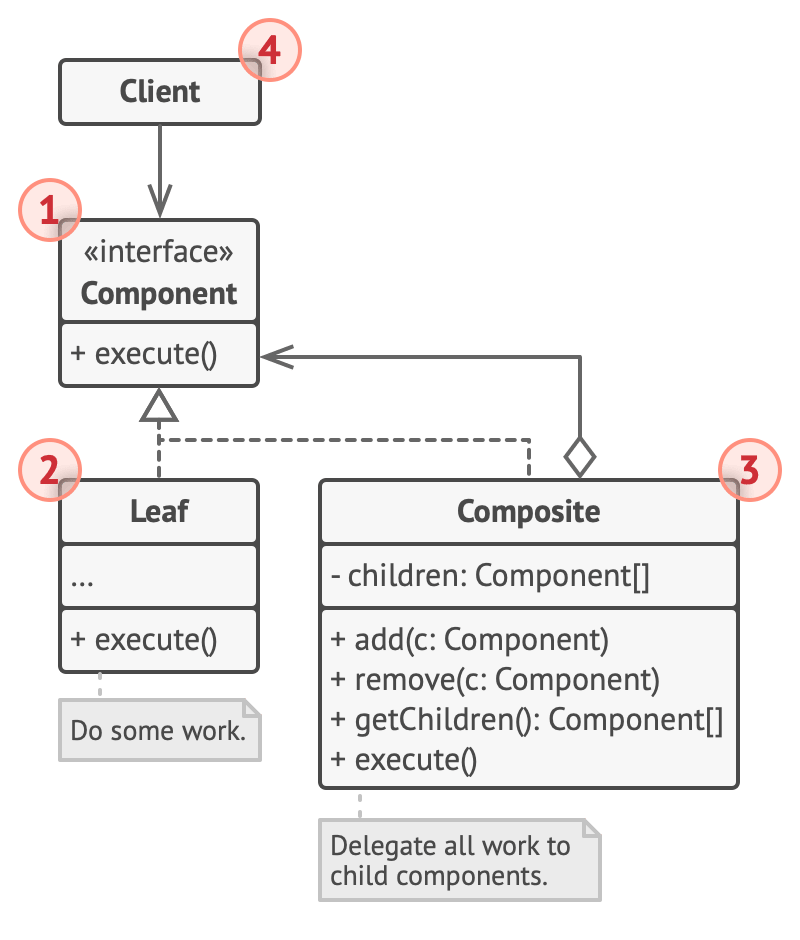
The Component interface describes operations that are common to both simple and complex elements of the tree.
-
The Leaf is a basic element of a tree that doesn’t have sub-elements.
Usually, leaf components end up doing most of the real work, since they don’t have anyone to delegate the work to.
- The Container (aka composite) is an element that has sub-elements: leaves or other containers. A container doesn’t know the concrete classes of its children. It works with all sub-elements only via the component interface.
Upon receiving a request, a container delegates the work to its sub-elements, processes intermediate results and then returns the final result to the client.
- The Client works with all elements through the component interface. As a result, the client can work in the same way with both simple or complex elements of the tree.
Applicability
- Use the Composite pattern when you have to implement a tree-like object structure.
The Composite pattern provides you with two basic element types that share a common interface: simple leaves and complex containers. A container can be composed of both leaves and other containers. This lets you construct a nested recursive object structure that resembles a tree.
- Use the pattern when you want the client code to treat both simple and complex elements uniformly.
All elements defined by the Composite pattern share a common interface. Using this interface, the client doesn’t have to worry about the concrete class of the objects it works with.
How to Implement
-
Make sure that the core model of your app can be represented as a tree structure. Try to break it down into simple elements and containers. Remember that containers must be able to contain both simple elements and other containers.
-
Declare the component interface with a list of methods that make sense for both simple and complex components.
-
Create a leaf class to represent simple elements. A program may have multiple different leaf classes.
-
Create a container class to represent complex elements. In this class, provide an array field for storing references to sub-elements. The array must be able to store both leaves and containers, so make sure it’s declared with the component interface type.
While implementing the methods of the component interface, remember that a container is supposed to be delegating most of the work to sub-elements.
- Finally, define the methods for adding and removal of child elements in the container.
Keep in mind that these operations can be declared in the component interface. This would violate the Interface Segregation Principle because the methods will be empty in the leaf class. However, the client will be able to treat all the elements equally, even when composing the tree.
Pros and Cons
| Nice | Bad |
|---|---|
| You can work with complex tree structures more conveniently: use polymorphism and recursion to your advantage. | It might be difficult to provide a common interface for classes whose functionality differs too much. In certain scenarios, you’d need to overgeneralize the component interface, making it harder to comprehend. |
| Open/Closed Principle. You can introduce new element types into the app without breaking the existing code, which now works with the object tree. |
Relations with Other Patterns
-
You can use Builder when creating complex Composite trees because you can program its construction steps to work recursively.
-
Chain of Responsibility is often used in conjunction with Composite. In this case, when a leaf component gets a request, it may pass it through the chain of all of the parent components down to the root of the object tree.
-
You can use Iterators to traverse Composite trees.
-
You can use Visitor to execute an operation over an entire Composite tree.
-
You can implement shared leaf nodes of the Composite tree as Flyweights to save some RAM.
-
Composite and Decorator have similar structure diagrams since both rely on recursive composition to organize an open-ended number of objects.
A Decorator is like a Composite but only has one child component. There’s another significant difference: Decorator adds additional responsibilities to the wrapped object, while Composite just “sums up” its children’s results.
However, the patterns can also cooperate: you can use Decorator to extend the behavior of a specific object in the Composite tree.
- Designs that make heavy use of Composite and Decorator can often benefit from using Prototype. Applying the pattern lets you clone complex structures instead of re-constructing them from scratch.
Conceptual Example
#include <algorithm>
#include <iostream>
#include <list>
#include <string>
/**
 * The base Component class declares common operations for both simple and
 * complex objects of a composition.
 */
class Component {
  /**
   * @var Component
   */
 protected:
  Component *parent_;
  /**
   * Optionally, the base Component can declare an interface for setting and
   * accessing a parent of the component in a tree structure. It can also
   * provide some default implementation for these methods.
   */
 public:
  virtual ~Component() {}
  void SetParent(Component *parent) {
    this->parent_ = parent;
  }
  Component *GetParent() const {
    return this->parent_;
  }
  /**
   * In some cases, it would be beneficial to define the child-management
   * operations right in the base Component class. This way, you won't need to
   * expose any concrete component classes to the client code, even during the
   * object tree assembly. The downside is that these methods will be empty for
   * the leaf-level components.
   */
  virtual void Add(Component *component) {}
  virtual void Remove(Component *component) {}
  /**
   * You can provide a method that lets the client code figure out whether a
   * component can bear children.
   */
  virtual bool IsComposite() const {
    return false;
  }
  /**
   * The base Component may implement some default behavior or leave it to
   * concrete classes (by declaring the method containing the behavior as
   * "abstract").
   */
  virtual std::string Operation() const = 0;
};
/**
 * The Leaf class represents the end objects of a composition. A leaf can't have
 * any children.
 *
 * Usually, it's the Leaf objects that do the actual work, whereas Composite
 * objects only delegate to their sub-components.
 */
class Leaf : public Component {
 public:
  std::string Operation() const override {
    return "Leaf";
  }
};
/**
 * The Composite class represents the complex components that may have children.
 * Usually, the Composite objects delegate the actual work to their children and
 * then "sum-up" the result.
 */
class Composite : public Component {
  /**
   * @var \SplObjectStorage
   */
 protected:
  std::list<Component *> children_;

 public:
  /**
   * A composite object can add or remove other components (both simple or
   * complex) to or from its child list.
   */
  void Add(Component *component) override {
    this->children_.push_back(component);
    component->SetParent(this);
  }
  /**
   * Have in mind that this method removes the pointer to the list but doesn't
   * frees the
   *     memory, you should do it manually or better use smart pointers.
   */
  void Remove(Component *component) override {
    children_.remove(component);
    component->SetParent(nullptr);
  }
  bool IsComposite() const override {
    return true;
  }
  /**
   * The Composite executes its primary logic in a particular way. It traverses
   * recursively through all its children, collecting and summing their results.
   * Since the composite's children pass these calls to their children and so
   * forth, the whole object tree is traversed as a result.
   */
  std::string Operation() const override {
    std::string result;
    for (const Component *c : children_) {
      if (c == children_.back()) {
        result += c->Operation();
      } else {
        result += c->Operation() + "+";
      }
    }
    return "Branch(" + result + ")";
  }
};
/**
 * The client code works with all of the components via the base interface.
 */
void ClientCode(Component *component) {
  // ...
  std::cout << "RESULT: " << component->Operation();
  // ...
}

/**
 * Thanks to the fact that the child-management operations are declared in the
 * base Component class, the client code can work with any component, simple or
 * complex, without depending on their concrete classes.
 */
void ClientCode2(Component *component1, Component *component2) {
  // ...
  if (component1->IsComposite()) {
    component1->Add(component2);
  }
  std::cout << "RESULT: " << component1->Operation();
  // ...
}

/**
 * This way the client code can support the simple leaf components...
 */

int main() {
  Component *simple = new Leaf;
  std::cout << "Client: I've got a simple component:\n";
  ClientCode(simple);
  std::cout << "\n\n";
  /**
   * ...as well as the complex composites.
   */

  Component *tree = new Composite;
  Component *branch1 = new Composite;

  Component *leaf_1 = new Leaf;
  Component *leaf_2 = new Leaf;
  Component *leaf_3 = new Leaf;
  branch1->Add(leaf_1);
  branch1->Add(leaf_2);
  Component *branch2 = new Composite;
  branch2->Add(leaf_3);
  tree->Add(branch1);
  tree->Add(branch2);
  std::cout << "Client: Now I've got a composite tree:\n";
  ClientCode(tree);
  std::cout << "\n\n";

  std::cout << "Client: I don't need to check the components classes even when managing the tree:\n";
  ClientCode2(tree, simple);
  std::cout << "\n";

  delete simple;
  delete tree;
  delete branch1;
  delete branch2;
  delete leaf_1;
  delete leaf_2;
  delete leaf_3;

  return 0;
}